Стояла долго на дворе.
Зимы ждала, ждала природа,
Снег выпал только в январе,
На третье в ночь.
А.С. Пушкин
Глобальное потепление, говорите?
You can install at least 4Gb of memory on most motherboards today, but apparently you shouldn't install more than 3Gb if you're not running a 64-bit operating system.
Why?
Can't a 32-bit version of Windows (or Linux, or whatever) address 4,294,967,296 bytes (two to the power of 32) of memory, by definition?
When I open Task Manager and click the Performance tab, I see the memory limit is way more than 4Gb. I understand that includes the swap file, but if Windows can handle 8Gb or whatever of total memory including swap, why can't it handle 4Gb of physical RAM?
Steve
The executive summary: Yes, a plain PC running a 32-bit operating system - and if you're wondering if that includes your PC, then it almost definitely does - shouldn't have more than 3Gb of RAM (as I mentioned in passing in this Ask Dan), if you don't want to waste quite a lot of the last gigabyte.
If you install 4Gb, there is no way to make all of the RAM between 3Gb and 4Gb available without installing a 64-bit OS, which you can't do unless you have a 64-bit CPU. And even then it won't necessarily work.
So, to avoid hassles on current systems, it's best to stick with 3Gb or less.
(Note that the precipitate drop in RAM prices, particularly DDR2 memory, means that you might as well buy 4Gb for a DDR2 PC these days; the price difference is likely to be trivial, even if you buy a pair of 2Gb modules. Just don't expect most of the fourth gigabyte to be accessible.)
Fortunately, this isn't a big problem for most people, provided they know about it in advance. Three gigs is enough for even quite serious applications, and it's easy to install on most motherboards (two 1Gb modules, two 512Mb ones). And very nearly all of that three gigabytes will actually be seen by the system.
(The reason why not quite all of even three gigabytes is usable is related to the 4Gb problem, as we'll see.)
If you want to push the envelope, many new PCs these days are able to run a 64-bit operating system. 64-bit processors used to be weird server-class stuff, but ordinary desktop processors from the AMD Athlon 64 and Intel Core 2 onward (and even late model P4s) can run in 64-bit mode.
You have to get a separate version of Windows XP if you want the 64-bit edition, and it probably won't help much with memory limits anyway, as I'll explain in due course. But all of the retail versions of Windows Vista come with both 32 and 64-bit installers.
(Well, OK, except for the horribly crippled "Starter" edition of Vista, which isn't sold in most countries. And you probably don't actually get the 64-bit install disc, but instead have to send away to Microsoft and pay for shipping to have the thing you've already bought sent to you.)
Most PC users, though, are still using 32-bit versions of Windows (or Linux, or whatever). Then, you'll have the same "3Gb barrier" problems no matter what processor you have.
To understand why this is, you've got to go back. Way back. Back to the horrible old days of DOS and the 640 kilobyte barrier.
Back when PC users only had sixteen-bit operating systems, everybody was wrestling with the memory below the first megabyte line. That was partly because memory was expensive enough that installing whole megabytes of it was a grandiose fantasy, but it was mainly because of limitations that grew out of the cut-price IBM 8086 CPU's mere 20 memory address lines.
Two to the power of 20 bytes is one lousy megabyte. And that was the grand total memory address space available to the original PC.
A 1Mb memory limit was no big deal at the time, since only very rich people could possibly afford that much RAM, and you couldn't install more than 640 kilobytes in an early PC anyway.
The combination of the 640k maximum system memory and the one megabyte address limit, though, led to a design decision to use the memory addresses between 640 kilobytes and 1Mb as an input/output dumping ground for other hardware in the computer.
Your old PC's graphics adapter, for instance, had memory on it in which it held the data for whatever was on the screen at the time, and the computer's CPU needed to be able to read and write that memory. So each flavour of graphics adapter was assigned a portion of the 640-to-1024-kilobyte "Upper Memory Area" space as its own, and reads and writes to those addresses did stuff to the graphics adapter's memory. This process is called "memory mapped input/output", or MMIO.
This trick was all very well with computers like the original IBM PC, but when people started making PCs that could have more than 640 kilobytes of system memory, that system memory grew up into the addresses reserved for various other hardware. Now new workarounds had to be found if you wanted to find that last few kilobytes to run productivity software or games, and it all became very traumatising and hideous.
I apologise to any readers who have now remembered things that cause them to rock back and forth and mumble.
Let's fast-forward to the current era. For many years, it's been normal for personal computers to include a Memory Management Unit (MMU). MMUs were expensive add-ons for old computers, but modern CPUs all have one built in. A primary function of an MMU is to allow a computer to have "virtual memory", which in the PC world means "swapping" or "paging" data in and out of however much actual RAM you have as needed, keeping the swapped-out data in a file, or files, on hard drives.
Virtual memory is what allows your PC to have more than 4Gb of total memory, including the swap file(s). Memory management lets the computer augment its physical RAM, and lets programs running on that computer feel as if they've each got a simple solid space of memory available to them without treading on each others' toes. But virtual memory doesn't increase the amount of physical RAM you can have.
The explanation for the three-to-four-gigabyte problems is that modern computers include an arrangement conceptually similar to the old Upper Memory Area one. Many of the original Upper Memory Area MMIO reserved areas still exist today (for backward-compatibility reasons - otherwise you couldn't install DOS on a new PC), and a few more little ones sprouted above 1Mb as PCs went through their growing pains. Those are preserved today as well.
For this reason, a modern "3Gb" computer, which has 3,145,728 kilobytes of physical memory, is only likely to show something like 3,145,192 kilobytes available (look at the Performance tab in the Windows Task Manager, for instance). MMIO ranges "shadow" some of the physical memory, and so the system can't even see that RAM, at the hardware level.
3,145,728 minus 3,145,192 is only a shortfall of 536 kilobytes, though. So this 3Gb computer gives you 99.983% of the memory you paid for. Install more expansion cards in the computer, each of which is likely to eat some MMIO space for itself, and you'll lose a bit more memory. But you'll have to try pretty hard to lose even one whole megabyte.
I, for one, am OK with that.
But things get worse above 3Gb.
Large areas of the memory between three and four gigabytes are cordoned off for system devices in exactly the same way that chunks of the Upper Memory Area were purloined in the old days. Once again, the processor (and other system components) can talk with some devices by reading and writing memory addresses up above 3Gb.
The difference is the size of the reserved areas.
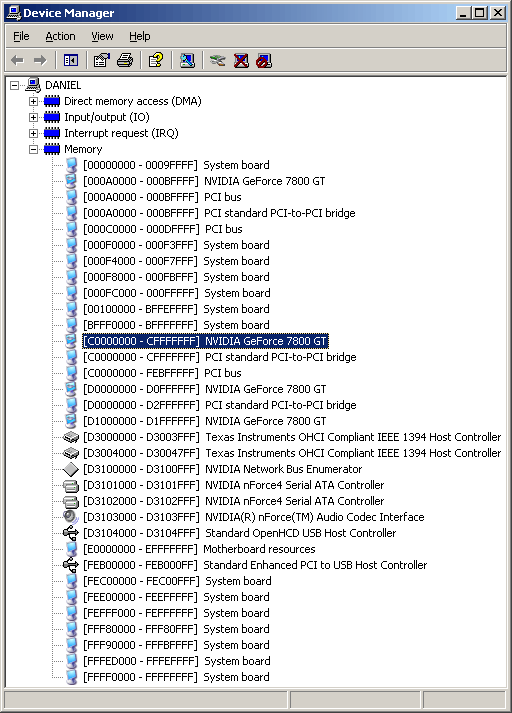
Windows users can see all of the reserved memory areas on their PC in Device Manager, using the View -> Resources By Connection option. This is what that view looks like for the PC I'm using now.
The addresses are all in hexadecimal, which makes it less than instantly obvious to the untutored viewer which reserved areas are tiny (and usually old) and which large (and all relatively new). Spend the time to figure it out, though, and you can see the old backward-compatibility stuff and the new 3Gb-barrier stuff, plain as day.
Hex addresses A0000 to BFFFF, for instance, are still assigned to the video card (a GeForce 7800 GT, in this case). That's addresses 655360 to 786431 in decimal, 640 kilobytes to 768k. This is the old 128 kilobyte reservation for the monochrome, CGA and EGA graphics buffers, still there in case you find your old Leisure Suit Larry disk and want to see if it works.
In the above picture, though, you'll see a much more considerable reservation from C0000000 to CFFFFFFF, that's also assigned to my video card. That's 268,435,456 bytes, equal to the 256 megabytes of memory on the card, and it's the chunk of memory addresses that system devices use when they want to access the card's memory.
If I had a video card with 512Mb or 768Mb of memory on it, it'd take up even more space in the 3Gb-to-4Gb memory map.
And if I were still using an AGP graphics card, there'd be another block of memory reserved for the AGP aperture, used when devices on other buses in the computer want to talk to a graphics card on the AGP bus. I've got a PCIe graphics card, though, which sits on the same bus as all of the other stuff and so doesn't need an aperture.
(If you've got a computer with one of those cheap graphics adapters that uses system memory instead of having RAM of its own, it will of course eat some of your RAM no matter how much you've got installed.)
Power users with a hankerin' for dual graphics cards may be experiencing something of a sinking feeling, at this juncture. Yes, the 256Mb reserved for my little old graphics card means exactly what you think it means: Those two 768Mb graphics cards you can totally justify buying will eat one point five gigabytes of your 32-bit memory map all by themselves, cutting you down to a 2.5Gb ceiling before you even take the other reservations into account.
This also explains why 1Gb graphics cards haven't hit the consumer market yet. Nobody yet needs anything like that much memory on one card for any desktop computer purpose, but some people would still be very happy to pay for such a card just for the pose value. It'd eat the whole of the fourth gigabyte of their system memory, though. And then they'd probably demand their money back.
(This fact has apparently not stopped certain unscrupulous companies, coughDellcough, from allowing people to buy a computer with WinXP, 4Gb of RAM, and a pair of Nvidia's oddball 1Gb GeForce 7950 GX2 cards. Result: 56.25% of the installed memory absent without leave. You might as well have only bought 2Gb.)
As with the Upper Memory Area problem, the 3-4Gb space must have seemed stratospherically far away when people first started buying $15,000 80386 PCs. But here we are running into it, and the result is not pretty.
That was then, this is now. 64-bit CPUs are widely available, and 64-bit OSes are starting to trickle into the mainstream market. The nightmare will, with any luck, soon be over.
A 64-bit PC running a 64-bit OS has a truly vast basic memory address space. The 4Gb 32-bit address space was 4096 times the size of the 1Mb 20-bit space, but the 64-bit address space is 4,294,967,296 times the size of the 32-bit one.
(Actual 64-bit PCs so far aren't actually able to address anything like that much memory, for reasons analogous to the restricted addressing of the old 8086; essentially, fewer memory address lines make for a cheaper computer. But even the most restrictive current x86-64 computer and operating system combinations can still address at least 2 to the power of 44 bits, which is 16,384 gigabytes. That ought to be enough for quite a while.)
By default, an all-64-bit PC will still have the standard big holes in its memory from three to four gigabytes. This is the lowest-hassle way to deal with the problem - just install more than 4Gb of memory, and live with the fact that your 8Gb PC with a 768Mb graphics card only actually has seven-point-not-much gigabytes of visible RAM.
One advantage of this is that you can still boot a 32-bit OS, if you want to. Another is that this vanilla configuration is most likely to actually work. Cleverer memory configurations aren't necessarily properly supported by hardware, operating systems and device drivers yet.
If you don't care about these factors, though, there are two ways to get the lost memory back.
Some 64-bit motherboards these days give you an option for "memory hole remapping". That moves the fourth-gigabyte MMIO memory holes higher into the 64-bit address space, probably way above the maximum RAM you can physically install.
Many other 64-bit boards, though, are even smarter, and can leave the memory holes where they are and remap (at least some of) the physical RAM out from under the holes and up past 4Gb. This process is often entertainingly referred to as "memory hoisting", and it used to be the preserve of server motherboards. It's been showing up in more and more desktop mobos, though. And on some of them, the memory-hoisting BIOS setting even works, and doesn't horribly crash the system as soon as something tries to use the remapped RAM.
You may only be able to "hoist" the last 512Mb of the 4Gb address space, but that's better than nothing. If it works.
I should add a note about the /3GB, /4GT and /PAE Windows boot.ini switches, too, because they often come up when people are talking about 4Gb-plus Windows PCs.
They are all useless to you. You do not want them.
/3GB and /4GT are config settings for different versions of Windows that tell the operating system to change the partitioning of the 4Gb 32-bit address space so that applications can use 3Gb and the OS kernel only 1Gb, as opposed to the standard 2Gb-each arrangement. They don't help at all with the 3Gb barrier, and most applications don't even notice them, so desktop users lose kernel memory space (and system performance) for no actual gain at all.
The /PAE boot.ini switch, on NT-descended Windows flavours, activates the Physical Address Extension mode that's existed in every PC CPU since the Pentium Pro. PAE can also be enabled by the /NoExecute entry in boot.ini, which turns on support for the NX bit which you probably also don't actually want.
PAE mode, in its proper form, cranks the memory address space up to 64 gigabytes (two to the power of 36). The computer can then give a 4Gb addressing block within that space - or even more, with extra tricks - to each of several applications.
PAE's no good to the everyday 3Gb-problem-afflicted user, though, for two reasons.
First, it presents 64-bit addresses to drivers, and thus causes exactly the same compatibility problems as a proper 64-bit operating system. Except worse, because now you need PAE-aware drivers for 32-bit Windows, instead of plain 64-bit drivers for a 64-bit OS.
From a normal user's point of view, PAE gives you the incompatibility of a 64-bit operating system when you're still running a 32-bit OS.
For this reason, Microsoft changed the behaviour of the /PAE option in almost all versions of WinXP as of Service Pack 2. They fixed the endless driver problems by, essentially, making /PAE in XP not do anything to addressing. All versions of WinXP except for the x64 Edition now have a hard 4Gb addressing limit, no matter what hardware you use them on and what configuration you choose. All PAE does in those versions of Windows is activate NoExecute support, which, once again, you probably don't want.
This isn't a big problem, of course, since XP is not meant to be a server operating system. But it's still mystifying to people who try the /PAE flag and can't figure out why it doesn't work.
Oh, and just in case you for some reason still wanted to try PAE: It eats CPU time, too.
(You can read more about boot.ini switches as they pertain to memory and driver breakage on Microsoft's page for driver developers, here.)
As things stand at the moment (June 2007), the sensible course of action for the vast majority of Windows users buying a new PC is to get a standard 32-bit WinXP system with at most 3Gb of memory. It'll come as close to Just Working as Windows ever does, and you'll be able to use as close to all of the installed RAM as makes no difference, if you don't go totally crazy with your video card choice.
(It's now the end of January, 2008, and I'm giving this article a bit of a polish. DDR2 RAM is now so cheap that if your PC takes that kind of memory, you might as well buy 4Gb. You still won't get much more actual usable RAM that way, but two 2Gb modules may actually cost you less than two 1Gb and two 512Mb modules. So what the hell.)
If you insist on buying Vista version 1.0, it's still not a bad idea to stick with 3Gb of RAM and use the 32-bit installation option, because 64-bit Vista needs 64-bit drivers. 64-bit drivers are not necessarily fully cooked, or even available, for the hardware you want to use. Many 32-bit XP drivers work in 32-bit Vista (subject to the limitations I explained back in the first Ask Dan), but no 32-bit XP drivers work in 64-bit Vista.
(If you've got 4Gb of RAM, by the way, the Vista installer may not work anyway. You can work around that problem, if you have it, by pulling some of the RAM while you install Vista, then putting it back. Apparently Microsoft limit the maximum available memory in 32-bit Vista to 3120Mb anyway, though, so it's hardly worth the trouble of buying more.)
It won't be long before 64-bit Vista becomes a sensible proposition for people who want a PC with 4Gb or more RAM. Right now, though, there's very little point to it for normal users.
Yes, if you install 8Gb of RAM (the artificially-limited maximum for Vista Home Basic; Home Premium can take 16Gb) in 64-bit Vista, you'll be able to use more than 7Gb of that RAM, no matter what. But unless you're using 64-bit workstation/server applications (not just Photoshop), or multitasking a whole lot of big 32-bit apps, or running multiple virtual computers on your one physical one, then the extra memory will only give you a small performance gain.
Small enough that if someone steals half of your memory, you may well not notice.
Date: 4 June 2007.
Last modified 03-Aug-2008.
О выходе на рынок серверов на конференции Oracle OpenWorld в Сан-Франциско заявил главный исполнительный директор компании Ларри Эллисон (Larry Ellison). Разработкой систем Oracle занималась вместе с компанией Hewlett-Packard. Первые представленные продукты получили названия HP Oracle Database Machine и HP Oracle Exadata Storage Servers.
На их создание ушло 3 года, и еще год – на тестирование у ключевых клиентов, включая Google.
HP Oracle Database Machine включает 8 серверов с жесткими дисками общей емкостью 168 ТБ. Система имеет 64 вычислительных ядра Intel и пропускную способность 14 ГБ/с, работает под управлением операционной системы Oracle Enterprise Linux. Ее стоимость составляет $650 тыс.
Второй продукт – HP Oracle Exadata Storage Server – являющийся составной частью Database Machine, может быть приобретен отдельно теми предприятиями, которым необходимо расширение существующей системы хранения данных. За основу сервера был взят HP ProLiant DL180 G. Он включает два четырехъядерных процессора Intel Xeon, 12 ТБ пространства на жестких дисках и шину InfiniBand с пропускной способностью 1 ГБ/с.
Выступая на заключительном этапе мероприятия, Эллисон рассказал об одной из наиболее существенных проблем СХД - проблеме пропускной способности. По его словам, современные системы не могут справиться с огромным объемом информации, который необходимо передавать с жестких дисков персональных компьютеров на серверы баз данных.

"Данных становится все больше, и время на их обработку увеличивается. Имея один терабайт данных, вы заметите падение скорости работы сервера. Десять терабайт приведут к существенному замедлению", - говорит Эллисон. В серверах HP Oracle Exadata Storage Server используется принцип параллельной обработки запросов, в результате чего, по словам главы Oracle, скорость работы увеличивается в 10 и более раз.
Выпуская серверы, базирующиеся на собственном программном обеспечении, Oracle перенимает опыт Apple, которая предлагает компьютеры Macintosh с собственной операционной системой OS X. Эллисон аргументирует, что путем совмещения собственного ПО и аппаратной части в одном продукте его эффективность в целом можно существенно увеличить.
Сейчас для покупки доступна только Linux-версия решений, но в будущем будут представлены варианты и на других платформах. Несмотря на то, что производством серверов занимается HP, распространять их будет именно компания Oracle. Она же будет осуществлять техническую поддержку, в то время как HP - отвечать за запчасти.
К основным соперникам Oracle на рынке, который компания планирует занять, наблюдатели относят производителей систем хранения данных Teradata и Netezza.
echo form_label('Month: ');
$options = array(
 '0' => 'New',
 '1' => 'January',
 '2' => 'February',
 '3' => 'March',
 '4' => 'April',
 '5' => 'May',
 '6' => 'June',
 '7' => 'July',
 '8' => 'August',
 '9' => 'September',
'10' => 'October',
'11' => 'November',
'12' => 'December',
'13' => 'I'm an idiot!',
);
printf("%10.2f", x);cout << setw(10) << setprecision(2) << showpoint << x;
    java.text.NumberFormat formatter
        = java.text.NumberFormat.getNumberInstance();
    formatter.setMinimumFractionDigits(2);
    formatter.setMaximumFractionDigits(2);
    String s = formatter.format(x);
    for (int i = s.length(); i < 10; i++) System.out.print(' ');
    System.out.print(s);
System.out.printf("%10.2f", x);if (str == "Привет") str = "\u0441\u043b\u0443\u0445\u0438";
На рабочем месте
Сидеть в кресле надлежит не в раскорячку али как-нибудь вычурно избоченясь, а чинно и смирно, дабы фигурами своими казенному имуществу вреда не учинить. Руками и ногами по столу отнюдь не колобродить, чай не мизгирь какой, а человек.
Рожи корчить, языки показывать да дикие вопли издавать словно деревенский бабуин не надлежит, ибо может статься зайдет человек посторонний и об деле вашем худое подумает, а коли и на камеру сие заснимет, так и вовсе конфуз может выйти. Вести же себя следует важно и лицо иметь сосредоточенное и даже как бы умное.
На рабочем месте не жри и не пий ничего, ибо сожаления достоен муж, клавиатура и мышь коего хлебом да колбасой до краев набита аки амбар какой али погреб.
На кресле задом наперед, ногами отталкиваясь, не езди с воплями «Я креведко!», ибо так и зашибить кого-нибудь немудрено. Хорошо ежели в программиста мягкого уткнешься, а ну как начальство переедешь, али бухгалтершу хрупкую пристукнешь? Баловство это.
С программистами
Коли случится баг какой, али аппликация выполнит недопустимую операцию, не спеши гневить бога и изрыгать проклятия, желая незадачливым программистам недугов тяжких и совокуплений противоестественных. Но приметь, отчего баг приключился и как повторить его еще раз. Опосля чего немедленно пиши в учтивых выражениях отчет о наблюдениях своих и отправляй репорт программистам. Коли сеньор-программер воспитал их в страхе божием, то баг в скорости будет обнаружен и исправлен. Ежели нет, то сам изволь сходить в их смердящую багодельню, где следует начать громко топать ногами, вращать очами, брызгать слюною, а также грозить батогами и каторгой, пытаясь вселить суеверный ужас и трепет в их души. Повелителю же их не шутя пообещай накакать в его кресло, коли баг не будет исправлен в ближайшие несколько часов.
Коли видишь, что программисты ленятся, чай пьют часами в трапезной или хентай смотрят богомерзкий, немедля устыди их. Ежели дерзят, отвечают неучтиво и, вообще, вольничают, брось в них грязью. Да не смутит тебя даже то, что у этих дурных людей могут быть хорошие дети, которые любят цирк.
Ласковое слово и кошке приятно. Потому, коли видишь программистов усердных в деле своем, учтивых в словах и искусных в соколиной охоте, то примечай их и говори им слова вежливые и хвали много. Глядя на их работу, даже если не бельмеса не понимаешь, принимай вид сурьезный, понимающе кивай головой и говори, что мол, код де хорош, и написано весьма толково. Ежели программист какой особо отличился, победил баг дюже страшный или из башки сам издумал алгоритм что твой Дональд Кнут, отчего радость великая во всем отделе и гомон веселый, невозбранно и в ноги ему пасть да об ковролин головою (своею) постучать истово в знак благодарности и восхищения.
Замечено, что программисты зачастую пишут функции, которые возвращают ложь (return false по-басурмански). Негоже это. Коли приметишь, такое непотребство, немедленно учини разбирательство и потребуй, чтобы такого боле не повторялось. А коли программисты начнут нести околесицу про булевы функции и необходимость возвращения двух значений, осади их и скажи, что для двух значений ложь не нужна. Можно же взять правду и горькую правду. Пущай везде в своем коде заменят ложь на горькую правду. Только так можно получить по настоящему благодатный код.
С начальством
При появлении начальства шапку немедля долой. Даже если это шлем с рогами резинками тугими к голове пристегнутый. Сымай и все тут, в крайнем случае рога вниз опусти благочестиво.
В очи начальства гляди учтиво. И как бы страшно они ни было, мертвым прикидываться не изволь. Это есть малодушие. Но и напротив, на кресле аки юла не вертись и ногами не сучи, словно закон сохранения момента импульса проверяючи. Хорошо ли будет, коли ненароком начальству тапкой в глаз заедешь, али ударишься обо что да в угол закатишься? Вестимо, конфуз может выйти.
Беседовать с начальством следует вежливо. Мнения свои преглупые держать при себе, а все больше участливо кивать головою, да поддакивать. Авось за умного сойдешь. Например: «Какой мудрости исполнены ваши слова…», «Ваша печаль отзывается в моем сердце…», «Позволь, я отрублю ему голову, повелитель!». А не как некоторые: «Бу-го-га, начальнег!» или «Оставь меня, не то я скормлю твою печень муравьям!». Выраженья подобные оставь, ибо, говоря так, лишь прослывешь глупцом и невежей.
На вечеринках
На ассамблеи мануфактурные лучше благочестивому отроку вовсе не ходить. Ибо коли там совсем не пить, то скучно, а коли пить, так потом конфуза не оберешься. Только и разговору после сего, как кто начальству мордасы набил, да кто на кого поблевал, да как девицы из маркетинга на столах голые плясали. Страмота одна.
Заключительное слово
Коли будешь придерживаться указанных правил, то достигнешь великого и до начальников своих возвысишься, а возможно и превзойдешь их. На обед будешь получать личное блюдо изысканной работы доверху усыпанное рахат-лукумом и колбасой. А приносить его будет прекрасноокая дева в радующих взор одеждах, да не одна а с подругами-балалаечницами в сарафанах да кокошниках, которые весь обед будут услаждать слух твой сладкозвучными песнями о великих героях, славных победах и большом адронном коллайдере.
Three things are certain:
Death, taxes, and lost data.
Guess which has occurred.
Everything is gone;
Your life's work has been destroyed.
Squeeze trigger (yes/no)?
Windows NT crashed.
I am the Blue Screen of Death.
No one hears your screams.
Seeing my great fault
Through darkening blue windows
I begin again
The code was willing,
It considered your request,
But the chips were weak.
Printer not ready.
Could be a fatal error.
Have a pen handy?
A file that big?
It might be very useful.
But now it is gone.
Errors have occurred.
We won't tell you where or why.
Lazy programmers.
Server's poor response
Not quick enough for browser.
Timed out, plum blossom.
Chaos reigns within.
Reflect, repent, and reboot.
Order shall return.
Login incorrect.
Only perfect spellers may
enter this system.
This site has been moved.
We'd tell you where, but then we'd
have to delete you.
Wind catches lily
Scatt'ring petals to the wind:
Segmentation fault
ABORTED effort:
Close all that you have.
You ask way too much.
First snow, then silence.
This thousand dollar screen dies
so beautifully.
With searching comes loss
and the presence of absence:
"My Novel" not found.
The Tao that is seen
Is not the true Tao, until
You bring fresh toner.
The Web site you seek
cannot be located but
endless others exist
Stay the patient course
Of little worth is your ire
The network is down
A crash reduces
your expensive computer
to a simple stone.
There is a chasm
of carbon and silicon
the software can't bridge
Yesterday it worked
Today it is not working
Windows is like that
To have no errors
Would be life without meaning
No struggle, no joy
You step in the stream,
but the water has moved on.
This page is not here.
No keyboard present
Hit F1 to continue
Zen engineering?
Hal, open the file
Hal, open the damn file, Hal
open the, please Hal
Out of memory.
We wish to hold the whole sky,
But we never will.
Having been erased,
The document you're seeking
Must now be retyped.
The ten thousand things
How long do any persist?
Netscape, too, has gone.
Rather than a beep
Or a rude error message,
These words: "File not found."
Serious error.
All shortcuts have disappeared
Screen. Mind. Both are blank.
In a Tokyo Hotel:
Is forbitten to steal hotel towels please. If you are not person to do such thing is please not to read notis.
In another Japanese hotel room:
Please to bathe inside the tub.
In a Bucharest hotel lobby:
The lift is being fixed for the next day. During that time we regret that you will be unbearable.
In a Leipzig elevator:
Do not enter the lift backwards, and only when lit up.
In a Belgrade hotel elevator:
To move the cabin, push button for wishing floor. If the cabin should enter more persons, each one should press a number of wishing floor. Driving is then going alphabetically by national order.
In a Paris hotel elevator:
Please leave your values at the front desk.
In a hotel in Athens:
Visitors are expected to complain at the office between the hours of 9 and 11 A.M. daily.
In a Yugoslavian hotel:
The flattening of underwear with pleasure is the job of the chambermaid.
In a Japanese hotel:
You are invited to take advantage of the chambermaid.
In the lobby of a Moscow hotel across from a Russian Orthodox monastery:
You are welcome to visit the cemetery where famous Russian and Soviet composers, artists, and writers are buried daily except Thursday.
In an Austrian hotel catering to skiers:
Not to perambulate the corridors in the hours of repose in the boots of ascension.
On the menu of a Swiss restaurant:
Our wines leave you nothing to hope for.
On the menu of a Polish hotel:
Salad a firm's own make; limpid red beet soup with cheesy dumplings in the form of a finger; roasted duck let loose; beef rashers beaten up in the country people's fashion.
In a Hong Kong supermarket:
For your convenience, we recommend courteous, efficient self-service.
Outside a Hong Kong tailor shop:
Ladies may have a fit upstairs.
In a Rhodes tailor shop:
Order your summers suit. Because is big rush we will execute customers in strict rotation.
Similarly, from the Soviet Weekly:
There will be a Moscow Exhibition of Aets by 15,000 Soviet Republic painters and sculptors. These were executed over the past two years.
In an East African newspaper:
A new swimming pool is rapidly taking shape since the contractors have thrown in the bulk of their workers.
In a Vienna hotel:
In case of fire, do your utmost to alarm the hotel porter.
A sign posted in Germany's Black Forest:
It is strictly forbidden on our black forest camping site that people of different sex, for instance, men and women, live together in one tent unless they are married with each other for that purpose.
In a Zurich hotel:
Because of the impropriety of entertaining guests of the opposite sex in the bedroom, it is suggested that the lobby be used for this purpose.
In an advertisement by a Hong Kong dentist:
Teeth extracted by the latest Methodists.
A translated sentence from a Russian chess book:
A lot of water has been passed under the bridge since this variation has been played.
In a Rome laundry:
Ladies, leave your clothes here and spend the afternoon having a good time.
In a Czechoslovakian tourist agency:
Take one of our horse-driven city tours -- we guarantee no miscarriages.
Advertisement for donkey rides in Thailand:
Would you like to ride on your own ass?
On the faucet in a Finnish washroom:
To stop the drip, turn cock to right.
In the window of a Swedish furrier:
Fur coats made for ladies from their own skin.
On the box of a clockwork toy made in Hong Kong:
Guaranteed to work throughout its useful life.
Detour sign in Kyushi, Japan: Stop:
Drive Sideways.
In a Swiss mountain inn:
Special today -- no ice cream.
In a Bangkok temple:
It is forbidden to enter a woman even a foreigner if dressed as a man.
In a Tokyo bar:
Special cocktails for the ladies with nuts.
In a Copenhagen airline ticket office:
We take your bags and send them in all directions.
On the door of a Moscow hotel room:
If this is your first visit to the USSR, you are welcome to it.
In a Norwegian cocktail lounge:
Ladies are requested not to have children in the bar.
At a Budapest zoo:
Please do not feed the animals. If you have any suitable food, give it to the guard on duty.
In the office of a Roman doctor:
Specialist in women and other diseases.
In an Acapulco hotel:
The manager has personally passed all the water served here.
In a Tokyo shop:
Our nylons cost more than common, but you'll find they are best in the long run.
From a Japanese information booklet about using a hotel air conditioner:
Cooles and Heates: If you want just condition of warm in your room, please control yourself.
From a brochure of a car rental firm in Tokyo:
When passenger of foot heave in sight, tootle the horn. Trumpet him melodiously at first, but if he still obstacles your passage then tootle him with vigor.
Two signs from a Majorcan shop entrance:
- English well talking.
- Here speeching American.
| Drug dealers | Software developers |
|---|---|
| Refer to their clients as "users". | Refer to their clients as "users". |
| "The first one's free!" | "Download a free trial version..." |
| Have important South-East Asian connections (to help move the stuff). | Have important South-East Asian connections (to help debug the code). |
| Strange jargon: "Stick," "Rock," "Dime bag," "E". | Strange jargon: "SCSI," "RTFM," "Java," "ISDN". |
| Realize that there's tons of cash in the 14 to 25-year-old market. | Realize that there's tons of cash in the 14 to 25-year-old market. |
| Job is assisted by the industry's producing newer, more potent mixes. | Job is assisted by industry's producing newer, faster machines. |
| Often seen in the company of pimps and hustlers. | Often seen in the company of marketing people and venture capitalists. |
| Their product causes unhealthy addictions. | DOOM. Quake. SimCity. Duke Nukem3D. 'Nuff said.' |
| Do your job well, and you can sleep with sexy movie stars who depend on you. | Oh well... |
SELECT
   column_name
,   data_type +
   COALESCE(
      '(' + CAST(character_maximum_length AS VARCHAR) + ')'
   ,  '(' + CAST(numeric_precision AS VARCHAR) + ')'
   ,  ''
   )
,   column_default
,   is_nullable
FROM
   information_schema.columns
WHERE
   table_name = 'tablename';